Published November 4, 2026 in How To
Product photos with a phone: a guide for shopkeepers

By Prashant Dodia
6 min read

TL;DR
- Position your setup near a window for bright, shadow-free natural daylight.
- Use a plain white or neutral surface to keep the focus entirely on the item.
- Keep one product in the frame to maintain visual clarity for shoppers.
Taking clear product photos with smartphone for shop listings is simple when you use natural daylight, a clean neutral background, and place one item in the frame at a time. High-quality images help neighbourhood customers browse your catalogue easily on the VoLoMart app before placing a local order.
Taking professional-looking pictures for your digital catalogue does not require expensive studio equipment. When you take product photos with smartphone for shop listings, simple techniques like daylight and clear framing make all the difference. This guide is for independent shopkeepers who want to showcase their inventory clearly and attract nearby customers on VoLoMart.
Why do clear catalogue photos matter for neighbourhood shops?
Clear images build immediate trust with buyers browsing your inventory on their phones. When shoppers see sharp, well-lit pictures, they understand exactly what they are purchasing from your store. Clear visuals also support small businesses aiming to meet basic digital standards outlined by the Ministry of MSME when modernising traditional retail operations.

How do you set up natural daylight for your shoot?
Natural daylight is your best tool for capturing accurate colours and details without harsh artificial glare. Place your shooting table within a couple of metres of a large window or glass door. Avoid using the phone's built-in flash, which often creates unnatural highlights and harsh shadows behind your merchandise.
- Position your table perpendicular to the window so light falls evenly across the side of the product.
- Shoot during daytime hours when the sun is bright and indirect to maintain consistent lighting.
- Turn off overhead fluorescent lights in the shop to prevent colour tints in your final picture.
What is the best way to arrange your background and framing?
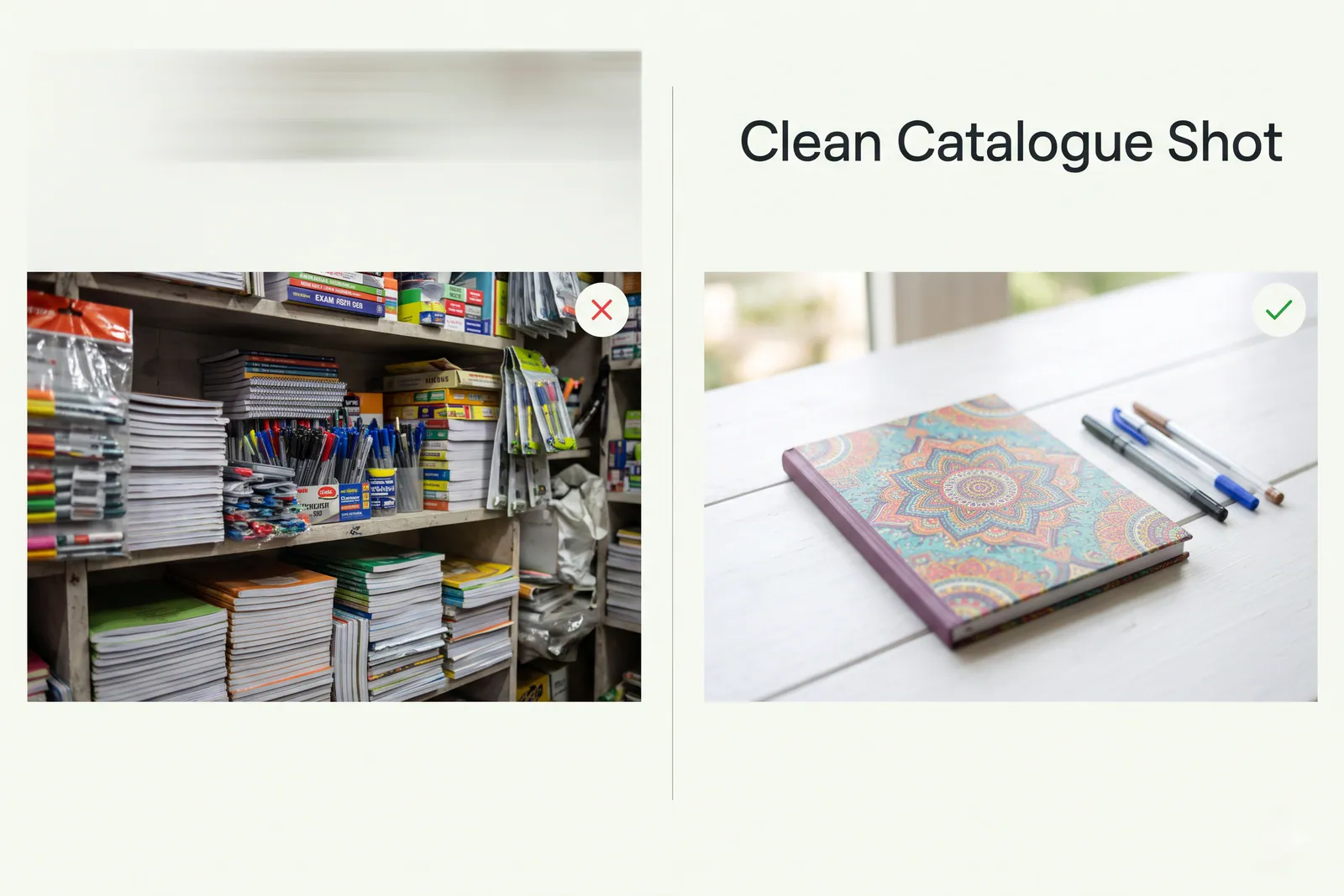
A cluttered background distracts buyers from the item you are trying to sell. Keep your staging simple by using a plain matte surface, such as a large white chart paper or a clean wooden board. Ensure that you place only one product in the frame at a time so customers can inspect every detail clearly.
| Setup Element | Recommended Approach | What to Avoid |
|---|---|---|
| Background | Plain white chart paper or clean neutral wall | Busy shop shelves or cluttered countertops |
| Lighting | Soft indirect daylight near an open window | Direct overhead yellow bulbs and camera flash |
| Composition | Single item centred in the frame with clear margin | Multiple piled-up items that obscure details |
How can you keep your phone steady while shooting?
Blurry images happen when your hand shakes while pressing the capture button on your phone. Rest your elbows firmly on the table or use an inexpensive mini tripod to keep the camera completely still. You can also use the built-in timer feature on your phone camera so the device settles down before snapping the picture.
How do you manage your digital inventory after the shoot?
Once your pictures are ready, you can easily update your digital catalogue directly through the VoLoMart app. Vendors manage their entire inventory and customer orders from the same application, ensuring smooth daily operations within the seller's own service area. For details on staying live on the marketplace after your trial, check our pricing page.
Frequently asked questions
Where do I register my shop on VoLoMart?
Registration and verification happen in the VoLoMart mobile app. Download the app, sign up as a vendor, and complete onboarding with shop details and service location.
Do I need my own website or app?
No. Nearby customers find the shop on VoLoMart after you complete setup in the mobile app, so you do not need a custom website or a separate ordering app.
Does VoLoMart take a commission on orders?
VoLoMart does not charge a commission on order value. The shop keeps the order value, and staying live after the trial is a subscription. See the pricing page for current plans.
Who delivers the order?
Fulfilment is handled by the shop with its own team or chosen setup. Hours, charges, and coverage are shop-controlled and shown on the vendor profile.
List your neighbourhood shop on VoLoMart
Sign up with the VoLoMart app. Start with a 7-day trial, then choose a monthly or yearly plan.
Get the app to registerRelated articles



6 min read